
In Memoriam: When DVDs become coasters

Check your discs!

It's so easy to buy something, and leave it in the cellophane for when you next have time. You can have unwatched discs stretching back years!

I bought the 20th Century Boys trilogy, telling myself I'll get around to watching it when I have time. And yesterday, got to movie three, and it died after the layer change. Freezing, chugging, pixellating and dying on all my players.

Now 4 Digital Asia, who released the boxset don't exist anymore, although4 Digital Media still does. I doubt they'll be offering any replacement discs, and neither will the store I bought it from... Play.com way back in 2010.
Ah that sucks dude, sorry to hear that. It's actually one of my biggest fears when I look at the more expensive items in my backlog.
 
I bought the 20th Century Boys trilogy, telling myself I'll get around to watching it when I have time. And yesterday, got to movie three, and it died after the layer change. Freezing, chugging, pixellating and dying on all my players.
Ugh, that's annoying. If it's any consolation, the third movie wasn't very good. It basically descended into nonsense by the end.
 
Sorry, wildy off topic, but... I must know what you thought of this cultured series? 😛 I watched all of the first season and was very impressed by the background art but otherwise not a massive fan (I mean sure the boobs and whatnot were nice but I wish more of these shows didn't feel like they are going out of their way to insult my intelligence and be a bit creepy while they're at it.)
It was ok-nothing special but a good way to get some quick entertainment.
 
I don't post here often, so advance apologies from a longtime lurker. My question is--does anyone know of a program that can check for read errors on optical media that is Mac compatible? I used ImgBurn back in the day, but have moved on from the PC ecosystem. I have a lot of BDs and DVDs that I would like to verify on my M1 Mac Mini without having to watch the entire discs! Thanks!
 
Ugh, that's annoying. If it's any consolation, the third movie wasn't very good. It basically descended into nonsense by the end.

Went through that warehouse at the end of Raiders of the Lost Ark, and found the review copy that 4Digital Asia sent me back in the day. Single layer DVD-R with no menu or extras, but it had the movie in chunky pixelvision.

I remember really liking the trilogy back in the day... but not so much this time around. I must have had my LOTR hypewagon goggles on when I first watched it.
 
My Last Exile ADV DVD Collection has a couple of discs that have started delaminating. The surface of the disc looks misty, as if someone has breathed on it. Only the mist doesn't evaporate. It's possible to clean the residue off with soapy water, or lens cleaner.
 
The surface of the disc looks misty, as if someone has breathed on it. Only the mist doesn't evaporate. It's possible to clean the residue off with soapy water, or lens cleaner.
Ugh, I have a bunch of discs that get like that. I thought it was outgassing from the case plastic, but I'm no expert. Normally a dry cloth is enough to wipe it off. The only one I've had that was stickier and more persistent was the Terminator TV disc that died on me; that was more like the disc was melting.
 
My Last Exile ADV DVD Collection has a couple of discs that have started delaminating. The surface of the disc looks misty, as if someone has breathed on it. Only the mist doesn't evaporate. It's possible to clean the residue off with soapy water, or lens cleaner.
This a pretty common occurrence-I had the same problem with my very rare set 1 of Blood+. What it turned out to be was the cheap ass thin cases they used for the dvds were emitting some kind of vapor that collected on the data side of the discs. It can easily be removed using 91% or higher isopropyl alcohol and a soft lint free cloth-that and new cases fixed the problem.
 
This a pretty common occurrence-I had the same problem with my very rare set 1 of Blood+. What it turned out to be was the cheap ass thin cases they used for the dvds were emitting some kind of vapor that collected on the data side of the discs. It can easily be removed using 91% or higher isopropyl alcohol and a soft lint free cloth-that and new cases fixed the problem.

If it was just the case plastic, it would affect all of the discs, but only two out of the seven are cloudy. I guess it’s a combination of the case and the disc manufacture.
 
You have different cases in a set don't you? One case could be farting on the discs while the other case would have no problems. I had 3 cases in the set mentioned-2 were problematic while the 3rd one had no problems.
 
You have different cases in a set don't you? One case could be farting on the discs while the other case would have no problems. I had 3 cases in the set mentioned-2 were problematic while the 3rd one had no problems.

This is the final ADV release, all seven discs in one case, four discs overlapping on two hinged panels with eco holes cut in to save plastic, one at the front, two at the back overlapping, all ‘breathing’ the same air. So far only discs 1 & 3 have needed cleaning.
 
"But your results may vary"-as far as I know there is no "forever" way to store data. Maybe in the next 100 years somebody will invent a way to write data into the very fabric of the universe?
 
1773959044222.png

This is easily the worst case I've seen so far. In the Thundercats DVD set I bought back in 2009, which has 24 discs, eight of them have out-gassed a sticky residue all over the data side. You may ask, "But how sticky can it be?"

1773959275286.png

Also, it's not just an even layer; there's an outer ring of raises beads that look like the disc is sweating.
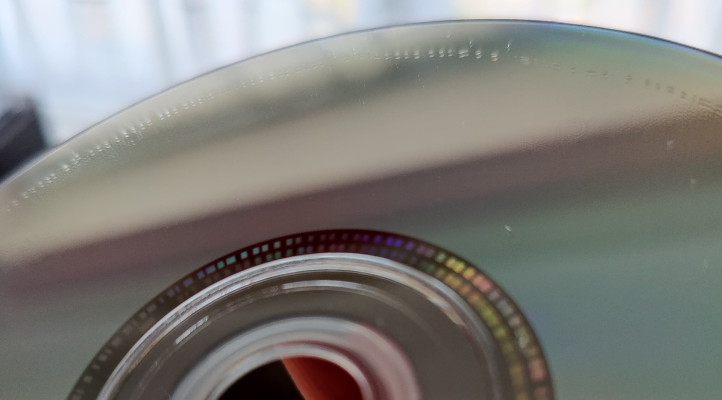
1773959509831.png

Curiously, that ring is as far out as the stickiness goes; the very outer edge is still normal. The disc cases have corresponding greasy patches that match this area, but that's not sticky, and the rest of the case surface is fine. So unless I'm missing something, it's probably the discs causing the problem in this instance, not the cases. Also, these are Warner Bros discs from the late 00s, so that's the main red flag for it being the discs themselves.

The glue-like consistency means I couldn't dry-wipe it off, so I did some research and tried experimenting. This page looked like a reliable source, since it's from the Council on Library and Information Resources: 6. Cleaning

I tried Zeiss lens wipes first, but they were useless for this. They didn't get the residue off and just left bits of paper stuck to the disc. What ended up working was a few drops of pure isopropyl on a micro-fibre cloth. Even the beads of liquefied plastic wiped off easily with that. Bear in mind these are DVDs though, so I don't know how well that would work for other types of discs.

That said, it's probably just a temporary fix if it is the discs themselves that are deteriorating due to WB's shoddy manufacturing in the 00s. With nothing to indicate that it's the cases instead, just swapping those out probably wouldn't do any good. I'm considering buying a whole new set. The one currently listed on Amazon has different packaging from the one I bought in 2009, so the discs will hopefully be a lot newer.

I hate having to deal with shoddy quality control like this. I've been stressed all month due to various aggravating things I won't get into, and watching 80s cartoons is usually my last line of defence. Now even those are out to annoy me. 😑
 
Believe me, isopropyl alcohol (91% or higher) is the best solvent for getting goop off of cds, dvds, blurays etc. And I'm going to say your cases are the problem-not the discs. When discs go bad they don't liquify, the reflective layer turns different colors as it degrades.
 
Yeah, seeing as the stickiness is only in a specific ring around the disc, likely where the disc comes in contact with the case then it is probably from the case itself. The issue is likely caused by the same issue that plagues older anime figures left inside boxes, plasticizer evaporating overtime in an enclosed space.
 
Yeah, seeing as the stickiness is only in a specific ring around the disc, likely where the disc comes in contact with the case then it is probably from the case itself. The issue is likely caused by the same issue that plagues older anime figures left inside boxes, plasticizer evaporating overtime in an enclosed space.
It's all rather confusing. If it was the cases, I would have assumed to see the opposite, that the cloudiness would be all over the case interior rather than confined to under the disc (the case surface is just cloudy rather than the stickiness on the disc itself). On the other hand, these are 2-disc slim cases, and for all eight affected discs it's both discs per case that are affected; there aren't any where just one of the discs is affected. I guess that does point towards the cases being the problem.

Another thing I'm wondering is if it would be better to store discs with the data side facing up when they're in slim cases with little clearance.
 
Back
Top